Introduction to Obsidian rant!!!!
 Obsidian is a super rad offline private file storage application. Used for notetaking, project writing, mini database collections (movie lists, game reviews, etc.), Zettelkasten, and much much more. It functions offline through the use of local folders where notes stored as .md markdown files. User’s don’t even need to have an account to access and use the software, I know I didn’t for my first ~4 months.
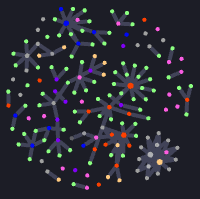
There are alot of standard features that make note taking dynamic. Notes can be liked together with [[backlinks]] & links to otherwebsites can be embeded [exterior links](website.website) even ![youtube](). In addition, there is an link visualizer I personally use for visuals & a canvas page for displaying notes, extra text, etc (not applicable to my usecases but there are plugins to improve it).
Two more things to note, there are alot of customization options that extend the software beyond its already capable and powerful stock state. Themes can be applied, utility plugin’s can be installed, and css snippets can be made. The best part of all of these features is good documentation exists on the wiki and themes + plugins can be downloaded directly from inside the software if desired. Even though the software is device local there are options for those that still need cross device compatibility (PC 🡘 Laptop 🡘 mobile) obsidian offers cloud sync with a paid membership (discount for students) it sync’s between devices with decent latency and comes with the option of end to end encryption. Even without paid support cloud connect is still possible to complete for free with a bit of work.
Custom Themes
Obsidian has an extensive list of community published themes to change the way your vaults look and feel! These are all free and kept up to date due to the lovely efforts of the aforementioned community members.
Because obsidian runs on a chromium back end it is very easy to take a look at the guts of the program and see all of the HTML & CSS classes & styles that these themes alter to make your vaults look so pretty ☆
Appearance - CSS Snippets
CSS code snippets can be used to customize the rendering of program windows, headers & other elements, text styles, exported pdf elements, image previews, etc.
I have made a few snippets to increase my workflows and improve visuals + usability.
Be warned, I have not tested my snippets with other themes. The Appearance_Tweaks snippet file I have made is used exclusively on my dark-mode vault with the theme “ Tokyo Night by tcmmichaelb139 ” that I use for taking class notes. The colors & shades I choose work best on my devices in darkmode, with the context of visual note-taking.
- AppearanceTweaks: altered syntax colors, minimized data tables, printable pdf export colors, Direct Download
Add’s color variations to bold, italics, bold-italics, highlight, & strikethrough to increase color options when making color-coded notes in your studies. Also has altered visuals for PDF export to help with the change from dark mode to the inherent light mode of paper / printable PDF’s.
- ImageRender: image display options (center, circle, round, float, etc.), Direct Download
⤷Add’s more image display options beyond just resizing ![[example.jpeg|#pixels]]
⤷To apply these options, add them to the file's extension name ![[example.jpeg|circle]]
Check the CSS file for keywords.
User Notes
This is a place where I will leave useful info or tidbits for new and returning users (me tbh)
All customizations for internal links: [[NoteName#HeaderLink|DisplayText]]